
Leather pattern software: hand drafting, vector apps, CAD and parametric generators
Leather patterns are drafted 4 ways: on paper with a ruler and dividers, in a vector drawing app, in a CAD program, or with a parametric generator that redraws the pieces whenever a measurement changes. Each works; they differ in how they handle the three things that go wrong in leather patterns: true scale, folds that use up length, and stitch holes that must match across layers. Here is what each tool does well, what it leaves to you, and what to look for whichever you pick.
Paper, ruler and dividers
The oldest method and still the best teacher. You measure the object, draw the outline on card, step the stitch line in with wing dividers and mark the holes with a pricking iron. Scale is never a problem, because you draw at full size. Folds are judged by wrapping the card around the real bar and marking where it meets. What it costs is time, and the pattern is one size: a new card size or a different buckle means a new drawing.
- Good for: one-off pieces, learning a construction, checking a digital pattern.
- Weak on: repeating a design in other sizes; holes across a fold, which you place by trial.
- Needs: a steel ruler, a square, a compass, wing dividers, a pricking iron, stiff card.
Vector drawing apps
Most digital leather patterns are drawn in a general vector app, the kind used for logos and illustrations. You draw the outline with paths, step a copy inward for the stitch line, place circles along it for holes, and export a PDF to print or an SVG for a laser. The drawing is exact and easy to edit, and the files are the ones machines read.
Two things need care. First, units: set the document to millimeters and export the SVG with its size in millimeters, or a laser will import it at 72, 90 or 96 pixels per inch and the pattern comes out a quarter wrong. Second, the app knows nothing about leather. A fold is a dashed line you draw where you think it goes; the holes on the far side are copies you mirror by hand. Whether they meet after the leather wraps a 2 mm bar is for you to work out.
- Good for: clean drawings, laser files, patterns you will sell as PDFs, decorative shapes.
- Weak on: folds (no thickness), hole spacing that fits an edge (you count and nudge), resizing (every number moves by hand).
- Needs: an app that works in millimeters and exports PDF and SVG; a 50 mm square you draw on every page yourself.
CAD programs
Mechanical CAD adds what vector apps lack: dimensions you can type, constraints that keep lines parallel or tangent, and in 3D programs a sheet-metal style bend that knows the material has thickness. A strap drawn as a sheet of 1.2 mm around a 2 mm cylinder unfolds to the right flat length. Makers who already use CAD for other work get the most from it.
The costs are learning time and setup. Leather is not sheet metal: its bend behavior depends on the tannage and the thickness, and the stitch holes, keepers and tongue slots are rules you build yourself, once per product. The DXF export is good for lasers and knife cutters; PDF printing at true scale usually needs an extra step.
- Good for: makers already in CAD, hardware fit, folded parts, exact DXF for machines.
- Weak on: the leather-specific rules (you encode them), quick iteration on a phone, printable PDFs.
- Needs: a 2D or 3D CAD program with DXF export; time to build each product once.
Parametric pattern generators
A parametric generator holds the rules of one product and draws the pattern from your inputs. Enter a card's size and a card holder is drawn 105 mm (4 1/8 in) wide for an 85.6 mm card, with the stitch line 4 mm inside the edge and the holes shared by every layer. Enter a watch's lug width, buckle and leather thickness and the strap's folds are computed: 5.9 mm at a 2 mm buckle bar for 1.2 mm leather, placed so the holes on both sides of the fold meet. Change one number and everything is redrawn.
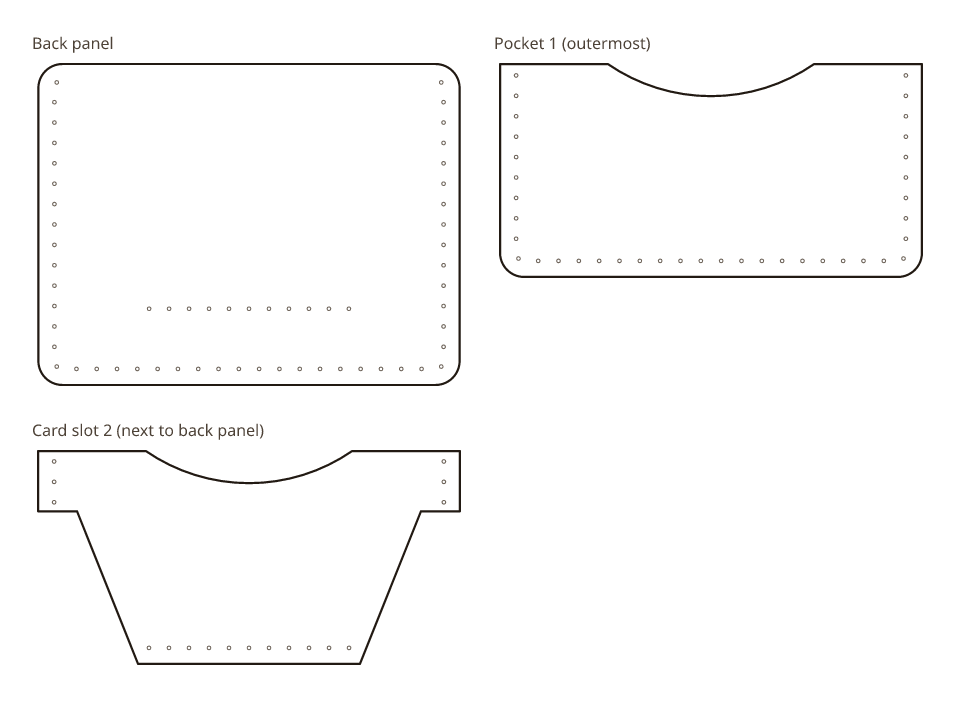
The limit is the catalog: a generator only makes the products it has rules for, in the constructions it knows. It will not draw your own design from scratch. And a generator is only as right as its rules, so look for one that says where its numbers come from and what has been built in leather.
- Good for: sized-to-fit versions of known products, true-scale PDFs with a test square, SVG and DXF of the same pattern, makers without drawing software.
- Weak on: original shapes, products outside its catalog.
- Needs: your measurements in millimeters and calipers to take them.
What to look for, whichever tool you use
- True scale on paper: a 50 mm square on every page, and a print at 100 %, not Fit to page.
- Millimeter units in SVG and DXF, so a machine imports the pattern at its real size.
- Folds drawn with the leather's thickness: the flat piece longer than the finished one, and the holes on both sides of the fold placed on the folded piece.
- One set of stitch holes per seam, shared by every layer, spaced to fit the edge or to match your iron exactly.
- A statement of what has been built in leather and what is only drawn.
Our generator is the parametric kind. It draws card holders, watch straps and a bifold wallet from your measurements; the preview is free and each file you download (PDF, SVG or DXF) costs one credit. Each generator page carries a status note that says what has been cut and sewn in leather and what has been checked in software only, and asks you to mock up any fold in scrap leather first. We do not promise a fit; the note says how far each pattern has been taken.
Try the parametric kind
Open a pattern, change a measurement and watch the pieces redraw. The preview is free; each file you download (PDF, SVG or DXF) costs one credit.
- See every patternCard holders, watch straps and a bifold wallet, each computed from your measurements.
- See pricingCredit packs and plans, in US dollars.
Questions
What software do leather workers use to make patterns?
Most digital patterns are drawn in a general vector app; makers with an engineering background use CAD; many still draft on card with a ruler and dividers. Parametric generators are the newest kind: they hold one product's rules and redraw the pattern from your measurements.
Is there free leather pattern software?
Free vector apps and free CAD programs exist and work for leather if you set them to millimeters and draw the folds and holes yourself. Our generator's preview is free; each downloaded file costs one credit.
Can I make leather patterns on a phone or tablet?
A parametric generator runs in the browser, so yes: you enter measurements and read the pattern on the screen, then print the PDF from any computer or send the SVG to a laser. Vector apps and CAD want a larger screen and a mouse.
What is a parametric leather pattern?
One that is computed from inputs rather than drawn once. The card holder's width is the card plus 5.7 mm of clear space and 4 mm to the stitch line on each side; change the card and the width changes. The same pattern file can be drawn again for any size the rules allow.
Related
Numbers from the card holder engine (pattern version 5.0.1) and the watch strap engine (pattern version 2.0.1). Updated October 25, 2026. More guides.