Laser cut leather patterns: what the SVG and DXF files hold, and how to prepare them
A laser or cutting machine needs a vector file at true scale, 1 unit = 1 mm, with only the lines it should cut: the piece outlines and the stitch holes. Our SVG and DXF files are drawn at 1 unit = 1 mm from the same pattern as the PDF, but today they are the print sheet, so you delete the paper-only parts first. This guide says what to keep, what to delete, how the beam width of about 0.1 to 0.2 mm changes holes, and why a fold line is a mark, never a cut.
What a machine needs from a pattern file
Three things. First, true scale: an SVG whose width and height are in millimeters with a matching drawing box, or a DXF in millimeter units, so a 20 mm strap imports as 20 mm. An SVG saved in pixels imports at 72, 90 or 96 pixels per inch depending on the program, which is a 25 % size error either way. Second, closed outlines: a piece is one closed path, not a chain of loose lines, so the machine cuts it in one pass and knows inside from outside. Third, nothing else: no page frame, no title, no labels, no test squares.
Our files meet the first two. Every piece outline is a closed path, stitch holes are circles, and the SVG declares its size in millimeters. The third point is where the work is: the SVG and DXF are today the print sheet, with the frame, the labels and the 50 mm test square on it, so a cleanup comes first.
Cleaning up the sheet before cutting
This is the text our export dialog shows above the SVG and DXF buttons, word for word:
In the DXF the parts are already sorted into layers: CUT holds the outlines, STITCH the stitch holes, FOLD the fold lines, GUIDE the marks and LABEL the text. Keep CUT and STITCH, delete the rest, and check the strap's paper-only drawings, which sit on CUT and STITCH too. In the SVG, select by color: the solid black lines are cut lines and holes, the dashed lines are fold lines and crop marks, the gray rectangle is the page frame. The home page's laser question walks through the same steps.
Stitch holes on a laser
A laser removes a thin line of material, the laser beam width (kerf), about 0.1 to 0.2 mm in leather on a CO2 machine and less on a diode. An outline comes out that much smaller, a hole that much larger. On a 22 mm strap the outline change does not matter; on a 1 mm stitch hole it does, so the hole you draw is the finished size you want and the machine's own beam-width (kerf) setting takes the beam into account. Measure your machine's beam width on a scrap of the same leather before a long job.
Holes under about 1.2 mm may not cut cleanly through: the beam spends too little time in one place. Slow the machine on the stitch-hole layer, or open the holes with an awl after cutting. A round stitch hole for 0.6 mm thread finishes at about 0.85 to 1.0 mm; our strap default is 1 mm, the card holder's 0.9 mm.
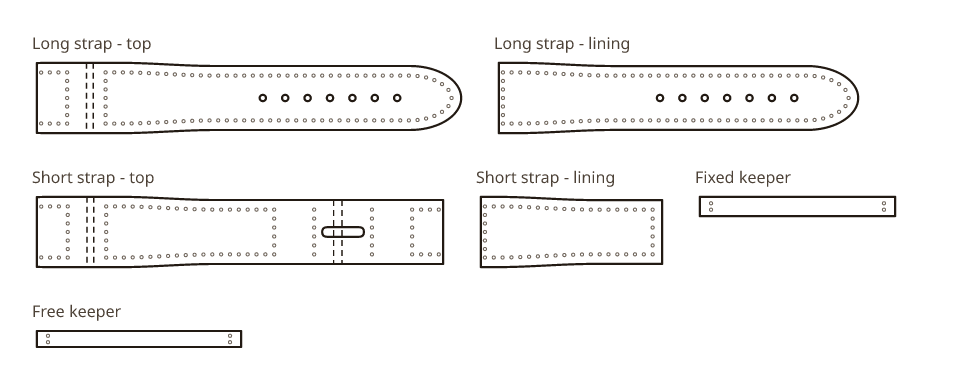
Which holes to cut on a watch strap depends on how you punch the folded ends. The pattern's default is to pre-punch everything: On a laser or cutting machine, cut every hole in every layer, the turnback holes too; you pin the layers through the P1 / P2 holes when you glue. If you chose to punch after gluing instead: This file has only P1 and P2 in each folded tail and no holes in the lining: cut it as it is, keep P1 and P2, and punch the other holes through all layers after gluing.
Fold lines: mark them, never cut or score them
A fold line on a leather pattern tells you where the leather will bend around a bar or on itself. Do not score it with the laser. A score on the grain face cuts the grain, and the leather cracks along the score when it folds. Delete the fold lines from the file or move them to a layer the machine does not output; if you need a mark, make a short tick at the piece's edge on the flesh side, by hand.
The fold's extra length is already inside the cut outline, so cutting the outline is enough: the default strap's long piece is cut 132.6 mm for a finished 115 mm, and that 17.6 mm is the leather that goes around the spring bar and the glued turnback behind it.
At the machine
- Keep the leather flat. A curled hide lifts out of focus and the cut wanders; tape the edges or weigh them down outside the pieces.
- Cut the stitch holes before the outlines, so the piece is still held by the hide while the small holes are cut.
- Expect a dark edge. Masking tape on the grain reduces the mark; clean the char out of the stitch holes before sewing or it blackens the thread.
- Cut one material and thickness per file. Our sheets name the leather on each piece: tops, linings and keepers are different leathers on the strap.
- Test on a scrap of the same leather first: a 50 mm square and a row of stitch holes tell you the beam width and whether the holes open.
Knife cutting machines take the same cleaned-up SVG. They cut outlines well; stitch holes under about 1.5 mm are better punched by hand through the cut outline, or scored as pierce marks and finished with an awl.
What is planned
A file for machines only, with the pieces and holes and none of the sheet marks, is on our list; until it ships, the cleanup above is the way. The PDF is unaffected: for hand cutting, print it at 100 % and check the 50 mm square.
Download a pattern as SVG or DXF
Open a generator, set your sizes, and download the SVG and DXF next to the PDF. The export dialog shows the cleanup steps for the machine file you chose.
- Open Watch strap · CustomEvery setting: lined or single layer, padding, hole shapes and stitching.
- Open Card holder · CustomEvery setting: 1–3 pockets per side, 6 styles and 19 pocket edge shapes.
Questions
Can I laser cut the patterns from Leather Pattern House?
Yes. Download the SVG or DXF, which are drawn at true scale in millimeters, and delete the paper-only parts first: fold lines, crop marks, test squares, labels and the gray page frame (in the DXF, keep the CUT and STITCH layers). The export dialog repeats these steps.
Are the SVG files in millimeters?
Yes. The SVG's width and height are in millimeters with a matching drawing box, so 1 unit is 1 mm and a 20 mm strap imports as 20 mm. If your software asks for a DPI on import, the file does not depend on it.
Should I laser cut the stitch holes or punch them?
Either. Laser-cut holes are round and stay open; draw them at the finished size (1 mm on the strap by default) and let the machine's beam-width (kerf) setting allow for the beam. Holes under about 1.2 mm may need an awl to open fully. A pricking iron gives slanted slits that close on the thread; for that, cut only the outlines and punch along the printed line.
Why should fold lines not be laser scored?
Because the score cuts the grain face, and leather cracks along a cut grain when it folds. Treat fold lines as marks: delete them from the machine file and mark the fold by hand on the flesh side if you need to.
What laser beam width should I allow for leather?
About 0.1 to 0.2 mm on a CO2 machine, less on a diode; it depends on the leather and the focus. Cut a 50 mm square and a row of 1 mm holes in a scrap, measure them with calipers, and enter the difference as the beam width (kerf) in your machine's software.
Related
Numbers from the watch strap engine (pattern version 2.0.1) and the card holder engine (pattern version 5.0.1). Updated October 25, 2026. More guides.